Skip to content
View in: India (₹) USA ($) Europe (€)
Menu
Nine lessons and a tested toolkit for making reels, explainers, kids songs, stories and product videos with Claude, Python and ffmpeg.

Make finished videos with Claude and code, from script to captions to export.

Nine written lessons, a toolkit that builds a captioned, loudness-checked video from one file, and a short demo reel. Written from the methods used to make the videos in the reel.

$12
One-time payment · instant download
Launch price until 07 December 2026. Regular price $18.

Stripe secure checkout

Secure payment GST invoice Instant delivery 7-day refund
The 23 second demo reel that comes with the course, made with its own method.
  • 9 lessons: the pipeline, scripting with Claude, voice, visuals drawn in code, AI-generated visuals with a visual bible, motion in ffmpeg, captions and sound, export and checks, and five video recipes with a series and publishing checklist
  • A toolkit that builds a finished video from one scenes file: read-along captions where each word lights up, music that ducks under the voice, loudness set to -16 LUFS, a quality check and a batch builder
  • Runs on day one with no paid service: stand-in voice and music files are included so you can test the whole chain before you spend anything
  • Each lesson has a goal, exact commands or code, common mistakes and an exercise, and says what was tested and what was not
  • PDF (28 pages, searchable), Markdown lessons, example files and a 23 second demo reel

We read 3,388 comments under other creators' videos before we built this.

Of the 185 that mentioned price, 29 complained about monthly subscriptions and 51 asked for something free.

Get the free AI Builder Cheat Sheet

Eight pages, free. Prompt formulas for Claude and ChatGPT, ten prompts for scroll-effect website sections, ffmpeg commands for making video with code, and free AI tools worth trying.

Does this sound familiar

The problem this solves

  • You make a video by hand: a script here, a voice there, an editor where everything is placed by eye.
  • By the third video the colours have drifted, a character changed clothes and the loudness is different.
  • Words inside AI pictures come out misspelled and change font between scenes.
  • Every small change means redoing a stage, and every stage that costs money gets paid for twice.
What changes
  • One scenes file that describes the whole video and rebuilds it after any change.
  • Captions timed from the real length of each voice file.
  • A quality check that reports size, length, loudness, black frames and silence.
  • A repeatable way to make a series, with the source of every video kept.
The problem

Why AI videos look inconsistent, and cost more than they should

Most people make an AI video by hand: a script in one window, a voice in another, pictures from a generator, then an editor where everything is placed by eye. It works for one video. By the third, the colours have drifted, a character has changed clothes, the captions sit under an app button and the loudness is different from the last one.

The tools are rarely the cause. The process is. Nothing is written down in a form you can rebuild, so every change means starting a stage again, and every stage that costs money gets paid for twice.

Words are the next problem. Image generators misspell and change fonts between pictures. Text is better drawn by a program, which never misspells what you told it to write.

The mechanism

One scenes file, one build command, one check

Every video is described in one scenes file: a list of scenes, each with a headline, a spoken line, a voice file and a motion. One command builds the whole video. The same file rebuilds it after any change.

The toolkit draws the pictures, adds read-along captions where each word lights up as it is spoken, puts music under the voice so that the music drops when the voice starts, and sets the loudness to -16 LUFS. A second command checks size, length, loudness, black frames and silence, and writes a contact sheet of twelve frames for you to look at.

For AI pictures, lesson 5 gives you a visual bible: one file that fixes the style, the characters and the places, and a script that builds every prompt from it, so the pictures stay consistent.

  • Pictures drawn in code, so spelling is always exact and the style is identical across scenes
  • Captions timed from the real length of each voice file, with no speech model needed
  • A quality check that fails loudly and a contact sheet that makes you look
  • A series check that compares every episode with its plan
What you get, counted

Nine lessons and eleven scripts, counted from the files

These are the lessons in the course. Each has a goal, steps with exact commands, common mistakes and an exercise.

  • Lesson 1: The pipeline and your setup
  • Lesson 2: Write the script with Claude
  • Lesson 3: Voice, one audio file per line
  • Lesson 4: Visuals drawn in code
  • Lesson 5: AI-generated visuals and the visual bible (optional)
  • Lesson 6: Motion with ffmpeg
  • Lesson 7: Read-along captions and sound
  • Lesson 8: Assemble, export and check
  • Lesson 9: Five recipes, series, and publishing honestly
  • A 28-page searchable PDF, the lessons as Markdown, eleven toolkit scripts, example files and a 23 second demo reel
Straight talk

What this course is not

It is not a video editor, a one-click video maker or a service that makes videos for you. You run the scripts and you look at the results.

It does not include voices, music, stock pictures or an AI generator. You bring your own, under their own licences. The kit includes plain test tones so you can check the pipeline first.

It was built and tested on Windows 11. It should work on a Mac or Linux, but that was not tested, and the TESTED file says exactly what was and was not run.

It makes no promise about views, followers or income.

If this describes the way you want to make videos, the course is one payment with instant download and a 7-day refund.

Get the AI Video Creator course
See every output

The reel, the ad and real pages from the PDF

Two videos made with the method, then pages straight from the course PDF so you can see how the lessons are written: code you copy, commands you run and a Tested note on each lesson.

The course ad, made with the method
A 29 second vertical ad made with the same pipeline. Voice-over removed here so it loops quietly.
Real output
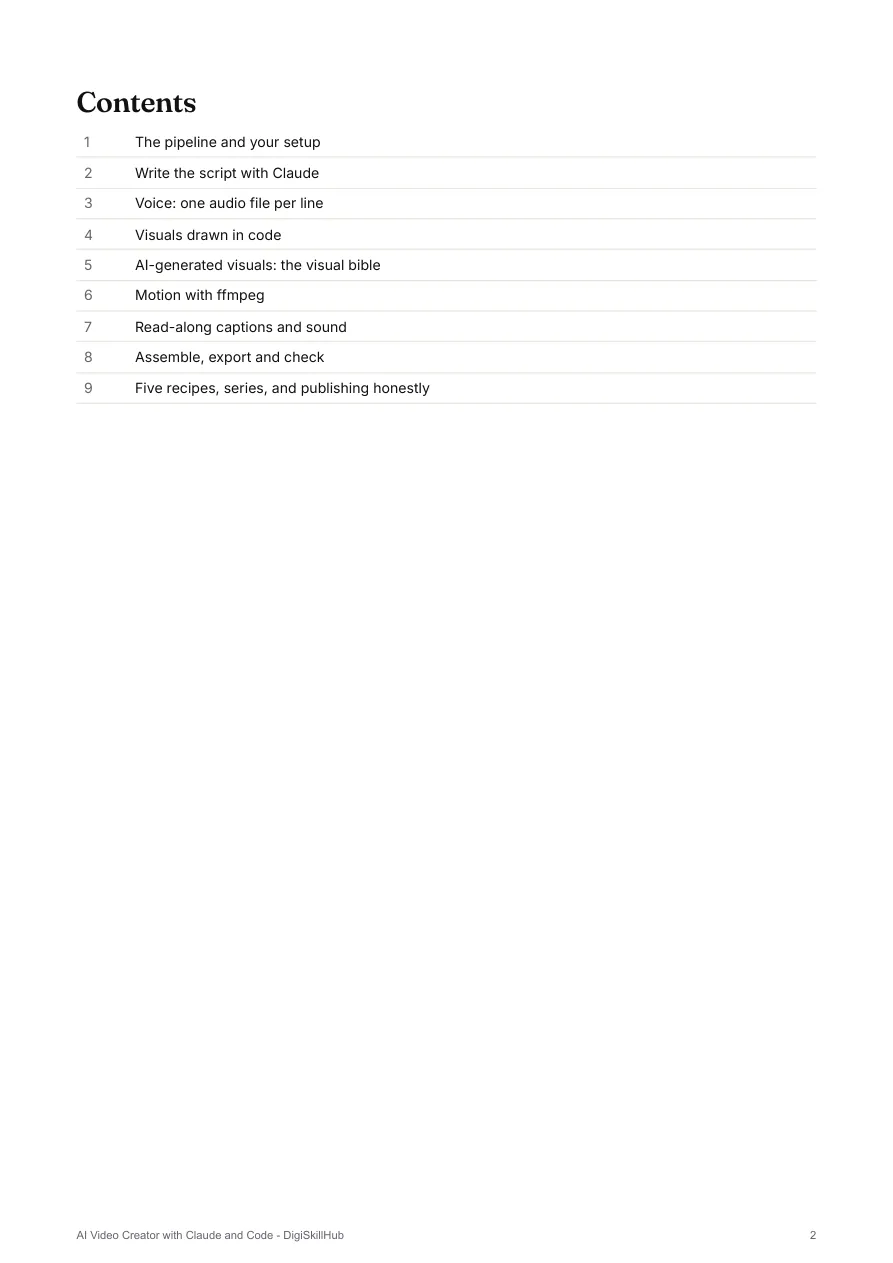
Page 2 of the course PDF: Contents 1 The pipeline and your setup 2 Write the script with Claude
PDF page 2 of 28 A page from the included PDF, shown as it is
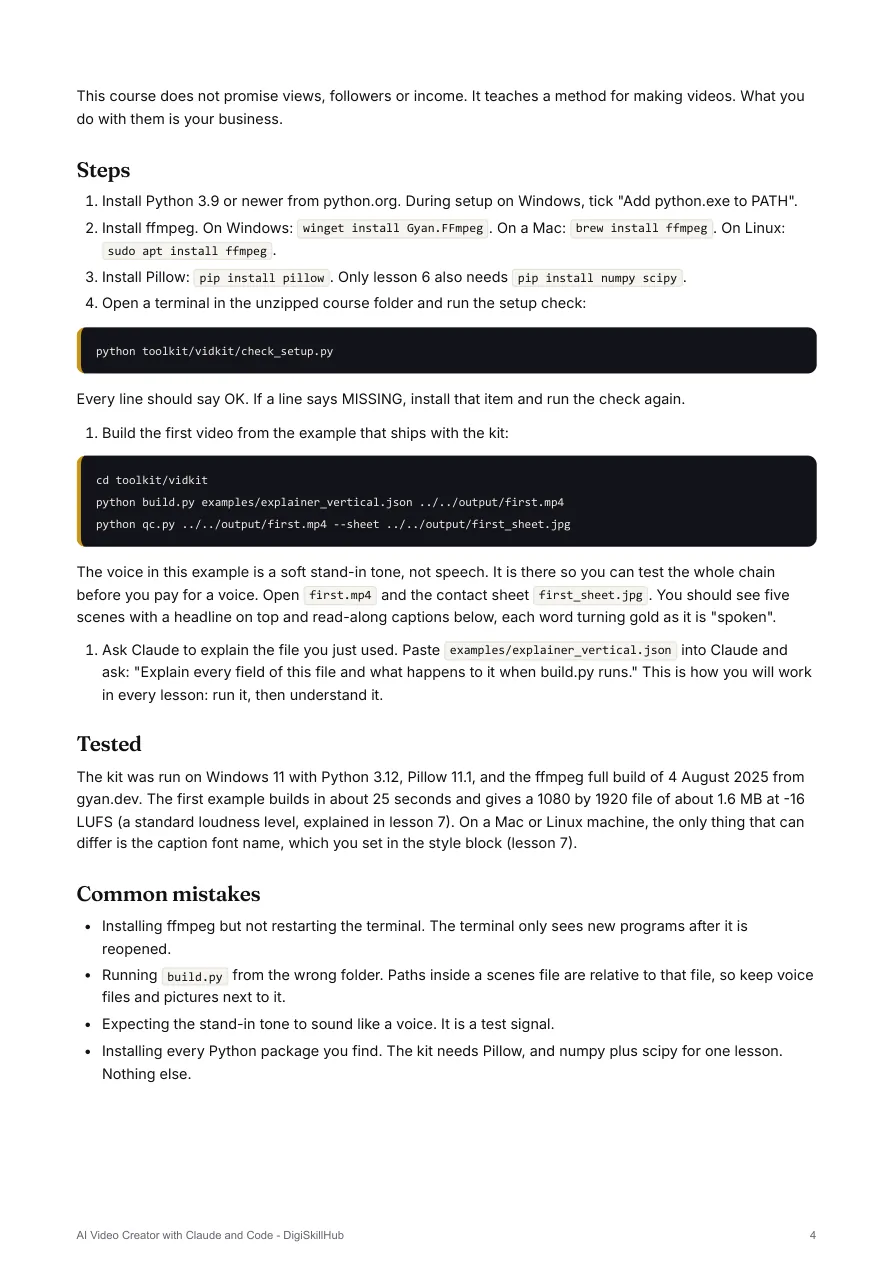
Page 4 of the course PDF: This course does not promise views, followers or income. It teaches a
PDF page 4 of 28 A page from the included PDF, shown as it is
Page 7 of the course PDF: ]} Rules: 5 to 8 scenes. Scene 1 is a hook question. The last scene is
PDF page 7 of 28 A page from the included PDF, shown as it is
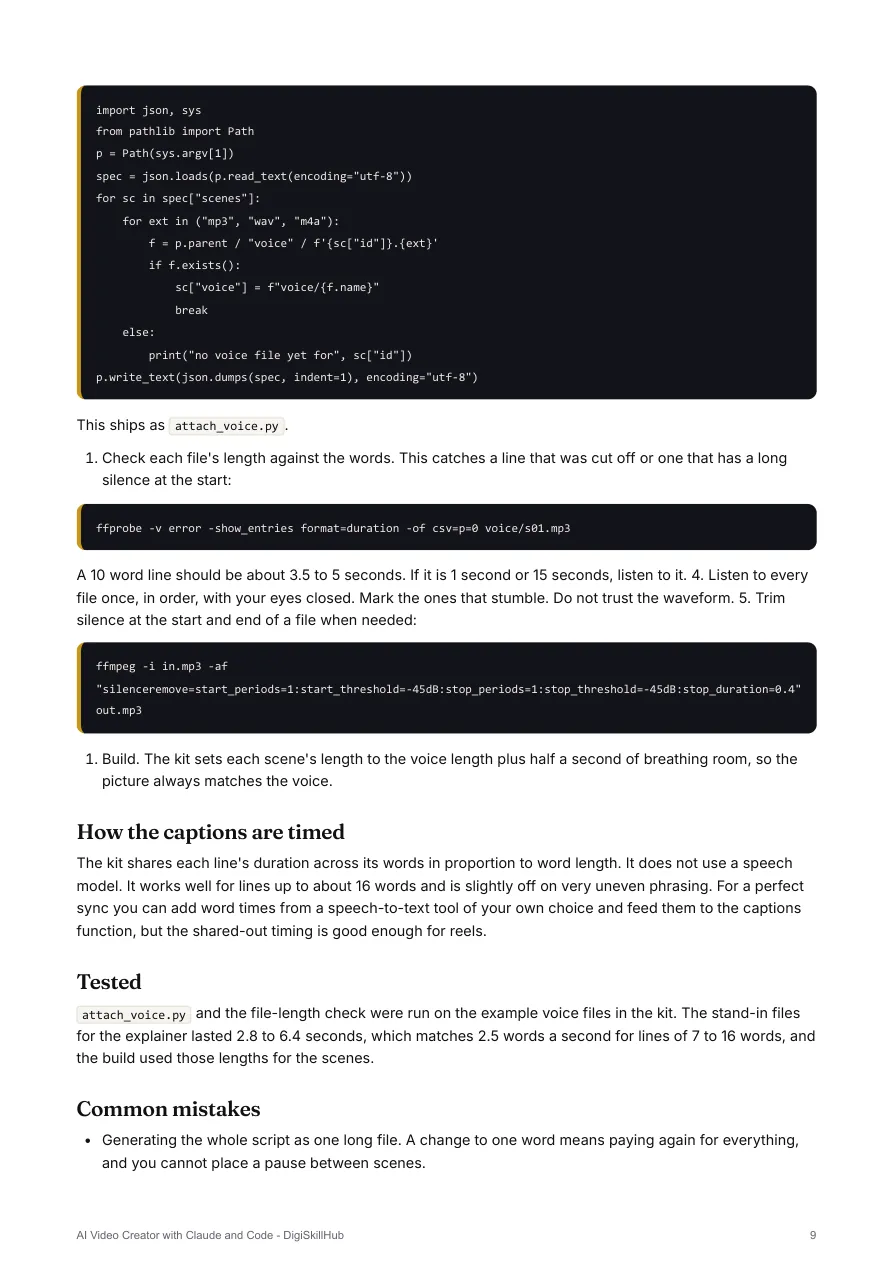
Page 9 of the course PDF: import json, sys from pathlib import Path p = Path(sys.argv[1]) spec =
PDF page 9 of 28 A page from the included PDF, shown as it is
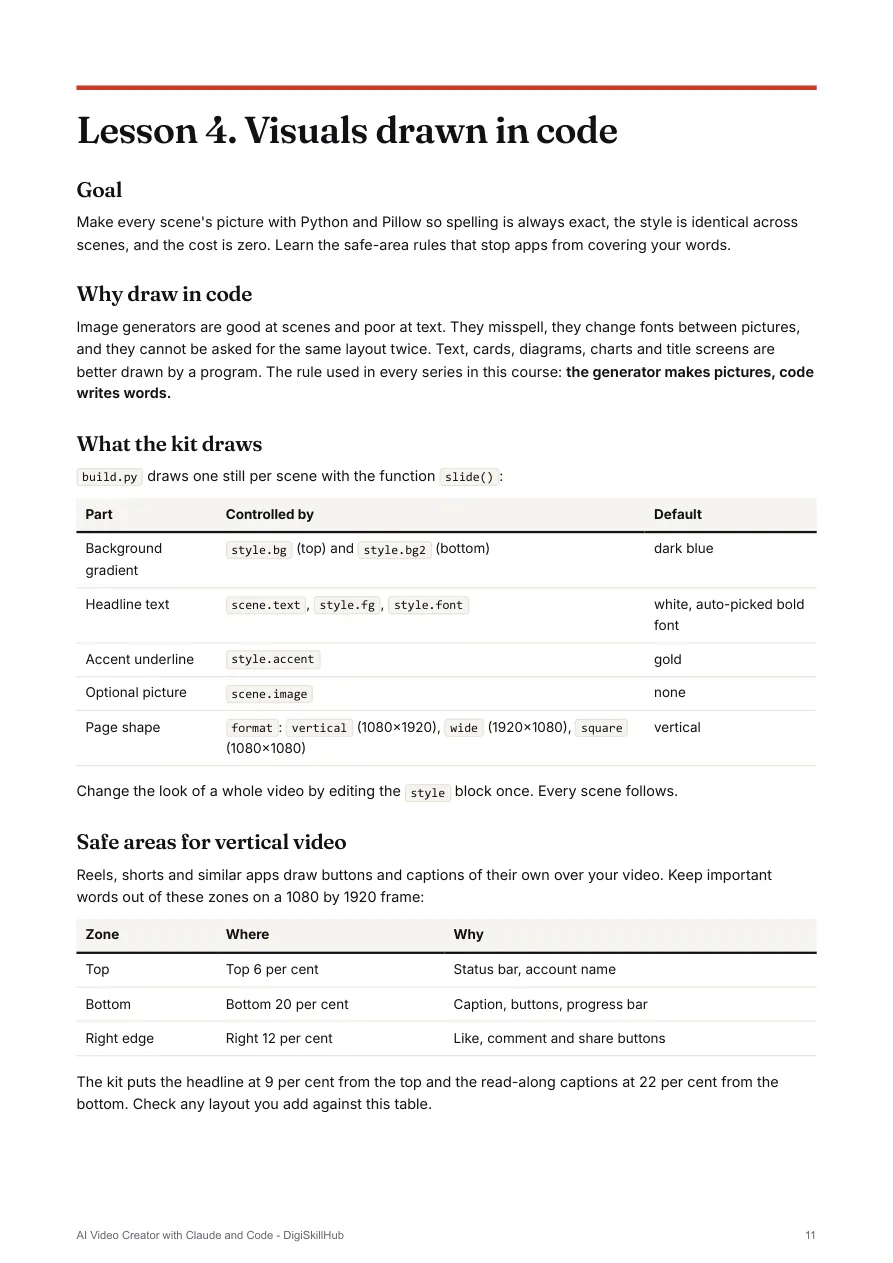
Page 11 of the course PDF: Lesson 4. Visuals drawn in code Goal Make every scene's picture with P
PDF page 11 of 28 A page from the included PDF, shown as it is
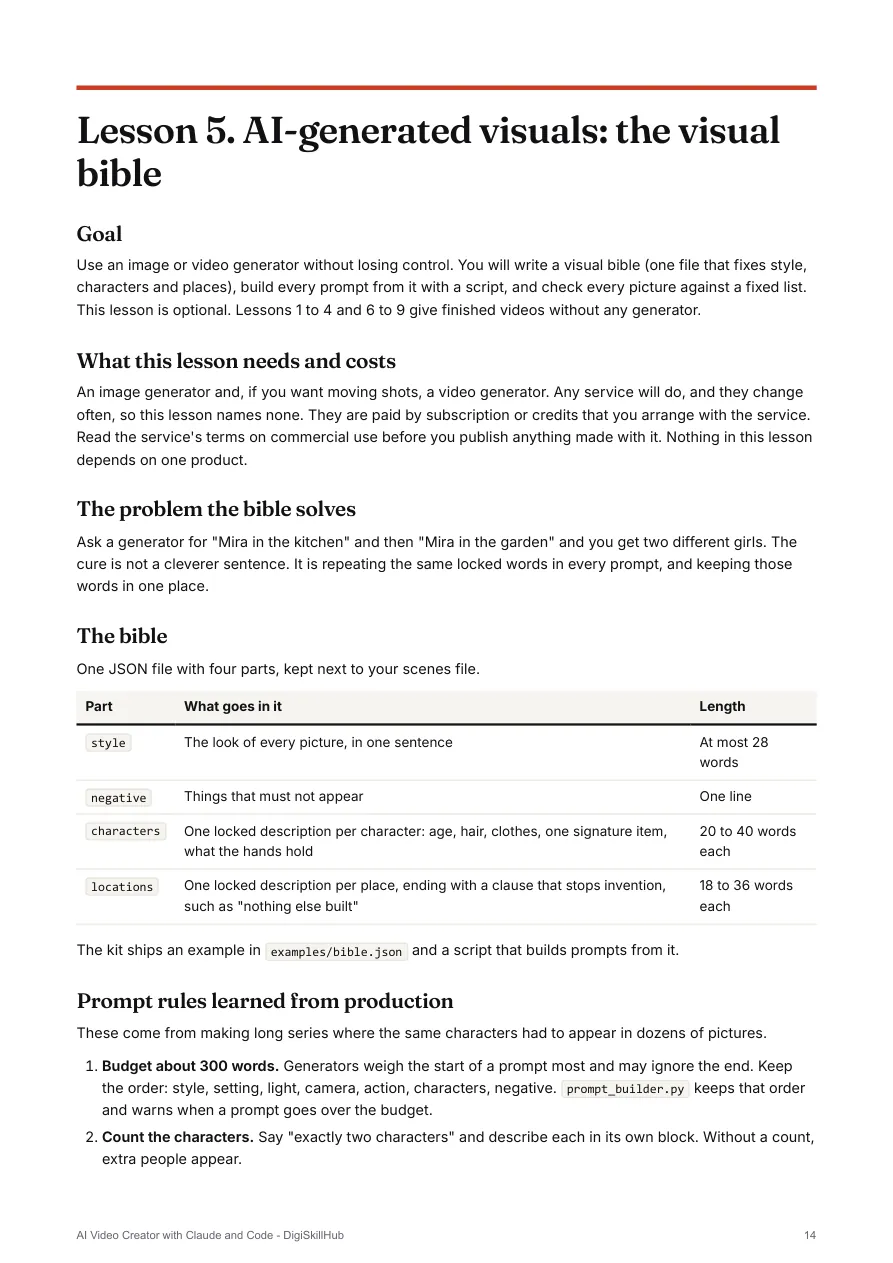
Page 14 of the course PDF: Lesson 5. AI-generated visuals: the visual bible Goal Use an image or
PDF page 14 of 28 A page from the included PDF, shown as it is
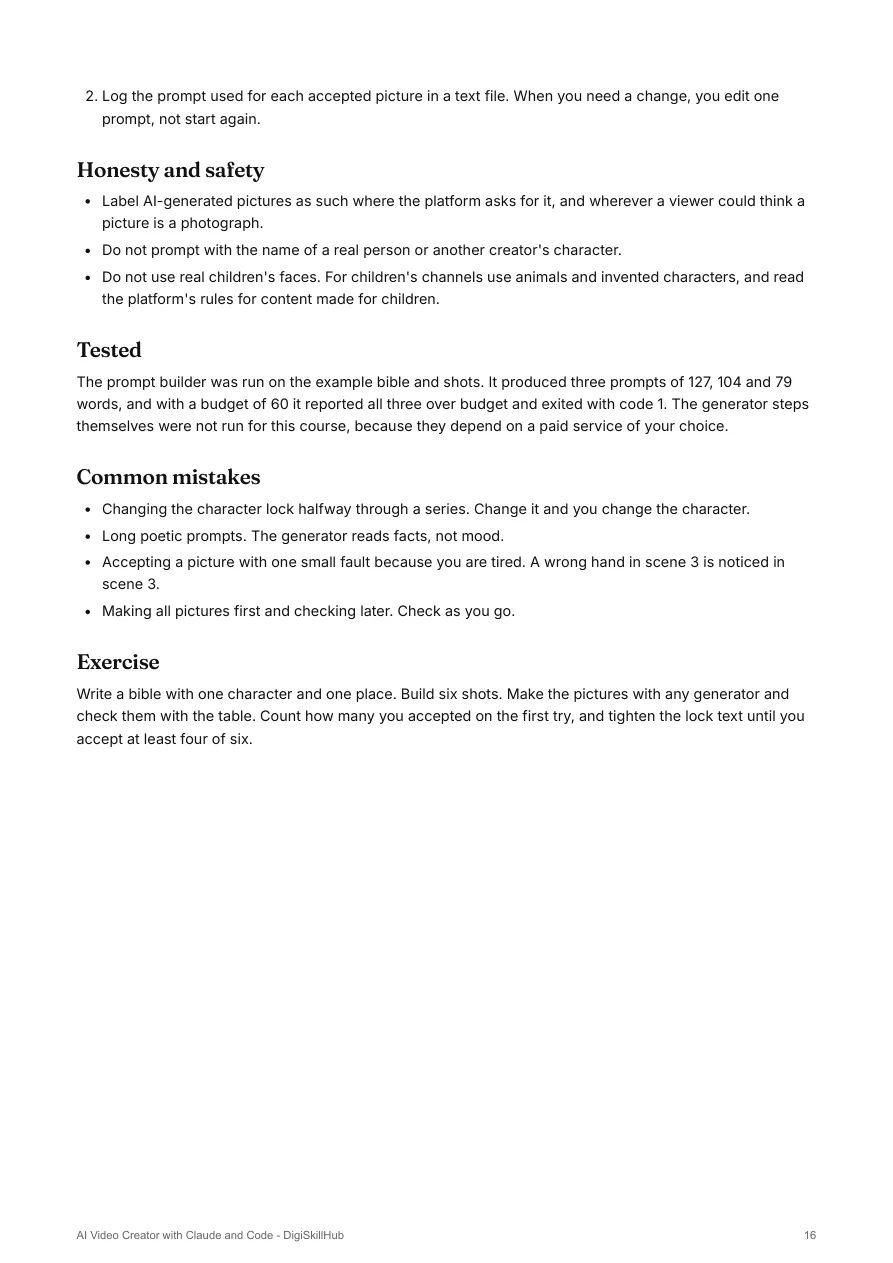
Page 16 of the course PDF: 2. Log the prompt used for each accepted picture in a text file. When
PDF page 16 of 28 A page from the included PDF, shown as it is
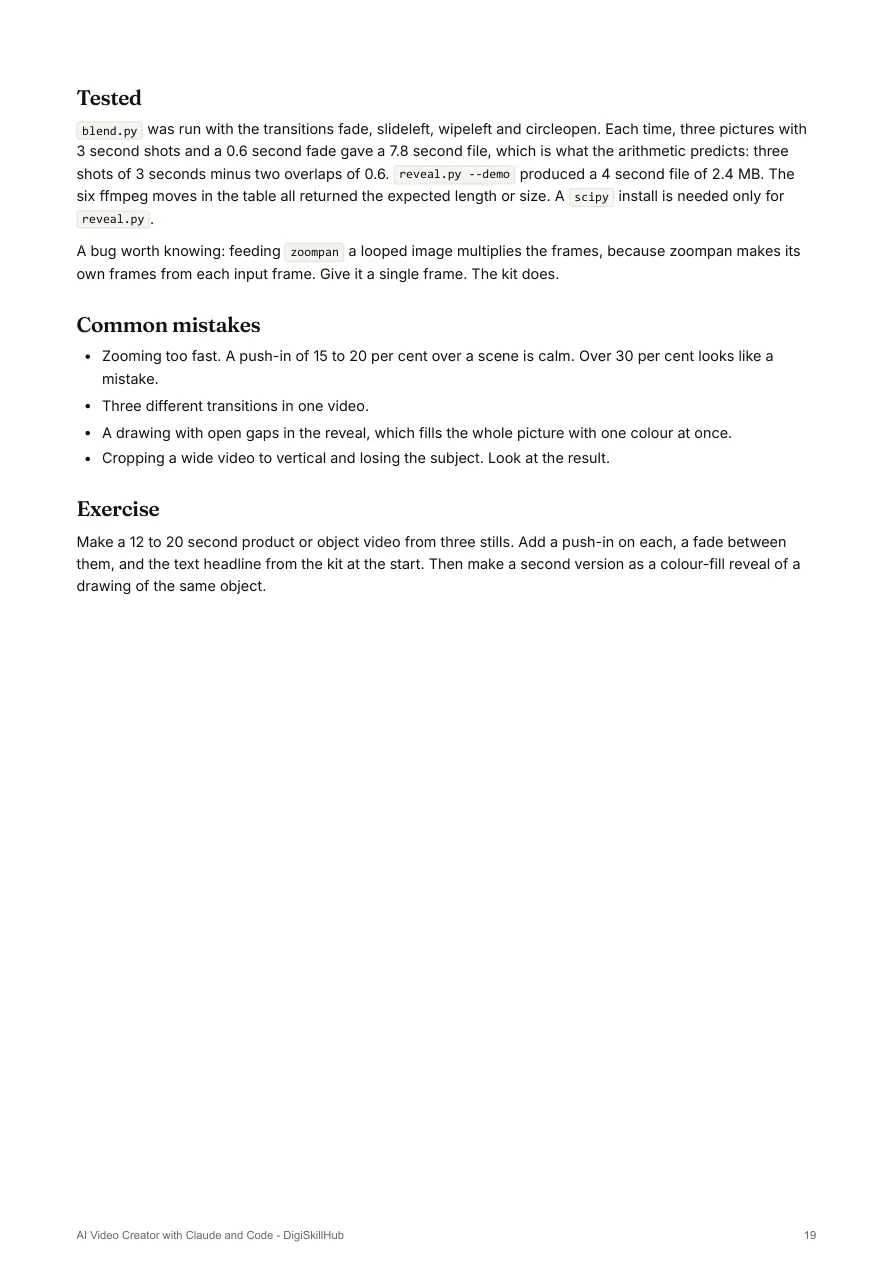
Page 19 of the course PDF: Tested blend.py was run with the transitions fade, slideleft, wipeleft
PDF page 19 of 28 A page from the included PDF, shown as it is
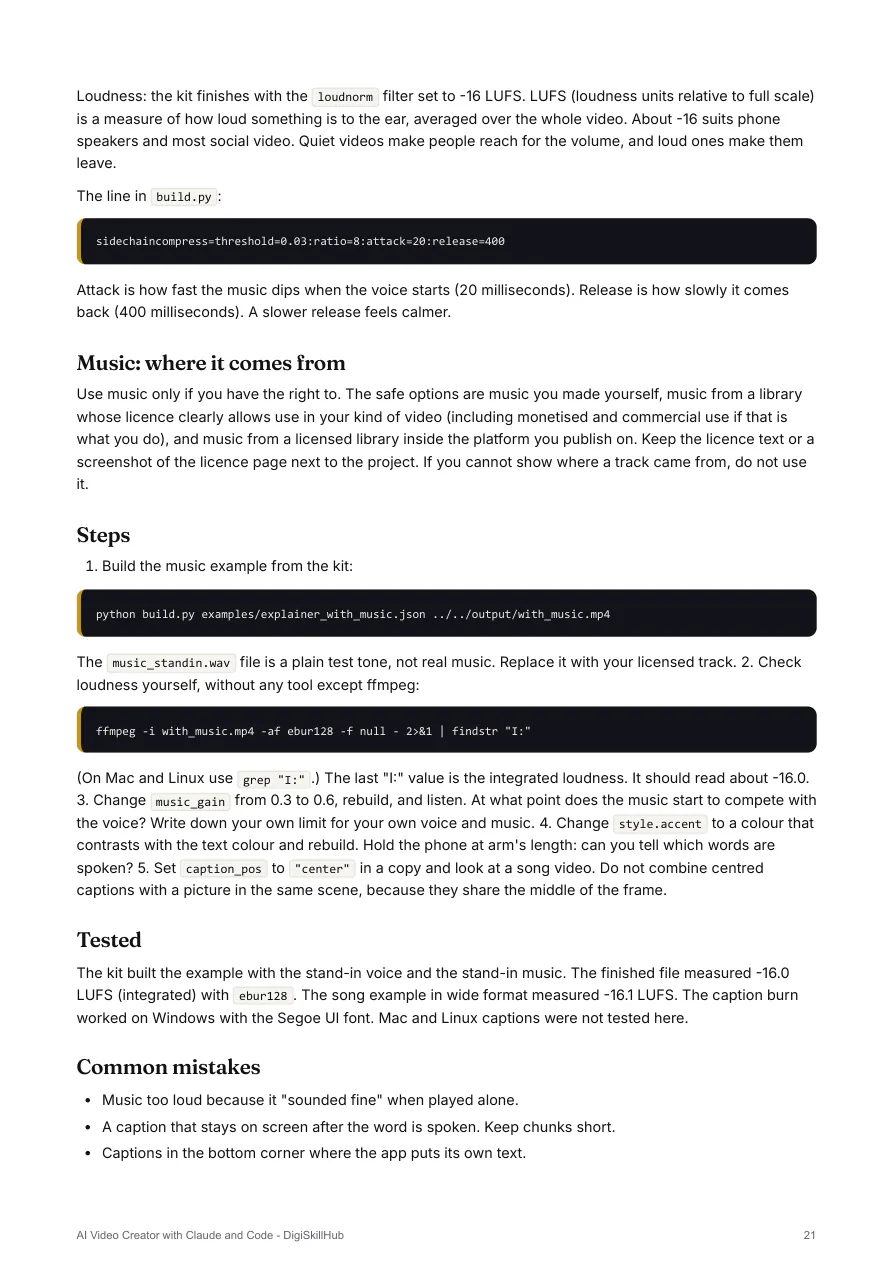
Page 21 of the course PDF: Loudness: the kit finishes with the loudnorm filter set to -16 LUFS. L
PDF page 21 of 28 A page from the included PDF, shown as it is
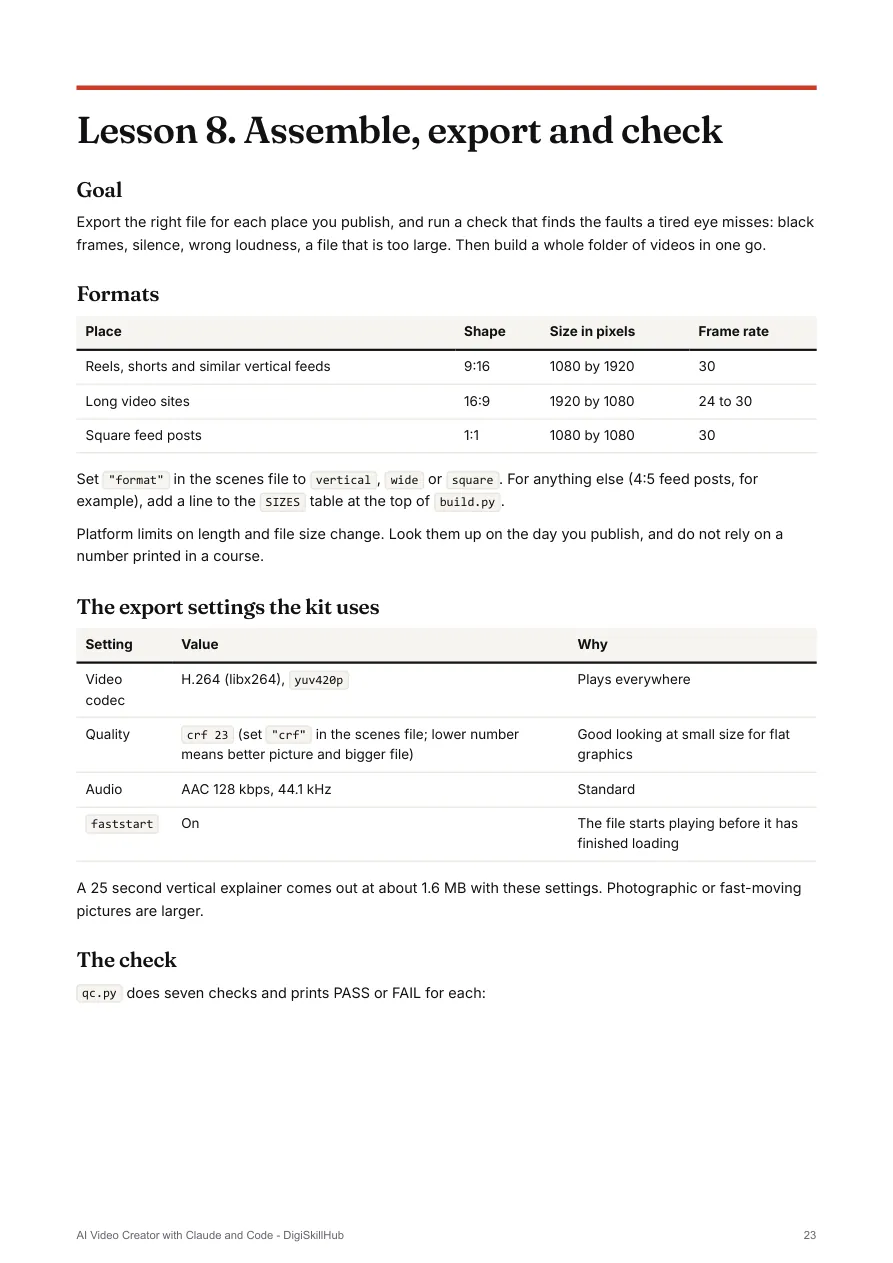
Page 23 of the course PDF: Lesson 8. Assemble, export and check Goal Export the right file for ea
PDF page 23 of 28 A page from the included PDF, shown as it is
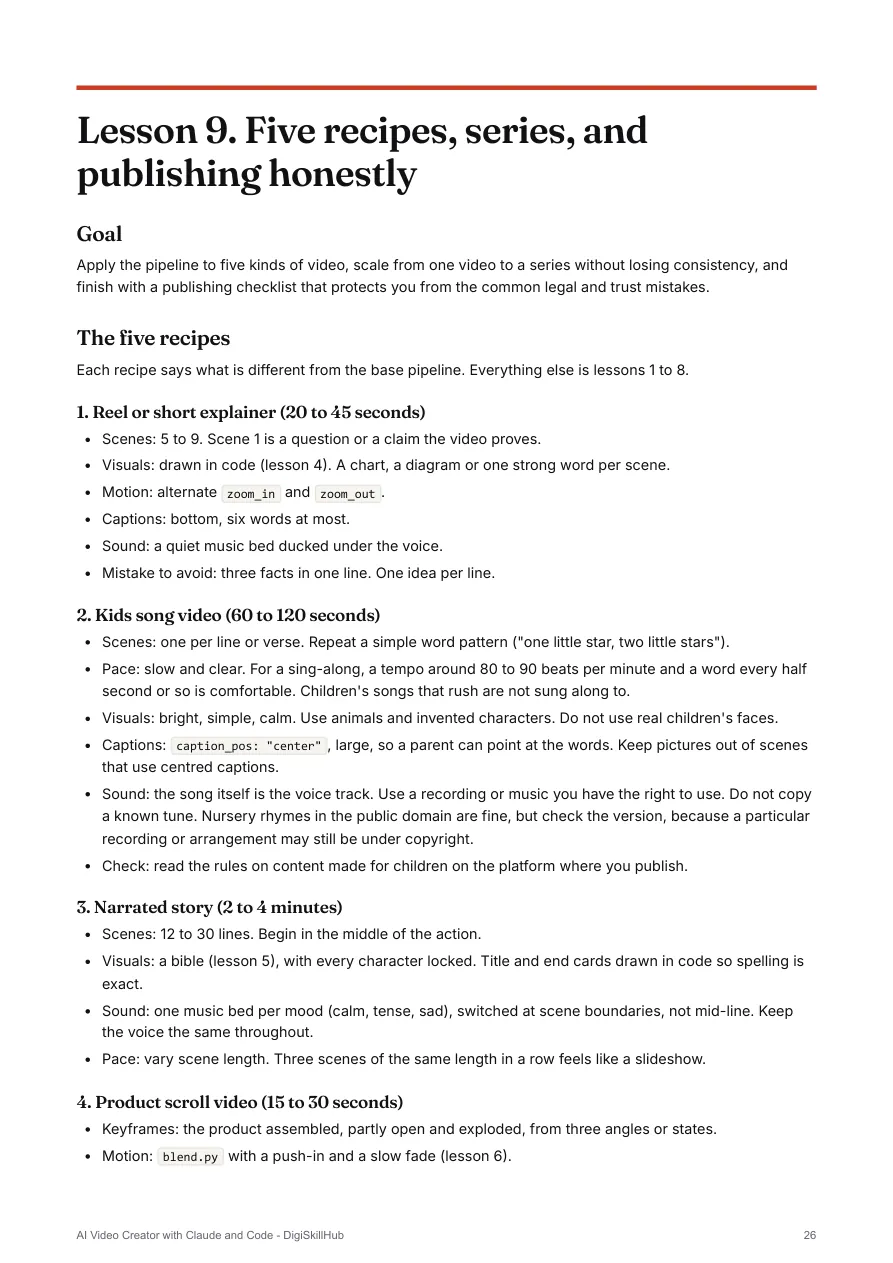
Page 26 of the course PDF: Lesson 9. Five recipes, series, and publishing honestly Goal Apply the
PDF page 26 of 28 A page from the included PDF, shown as it is
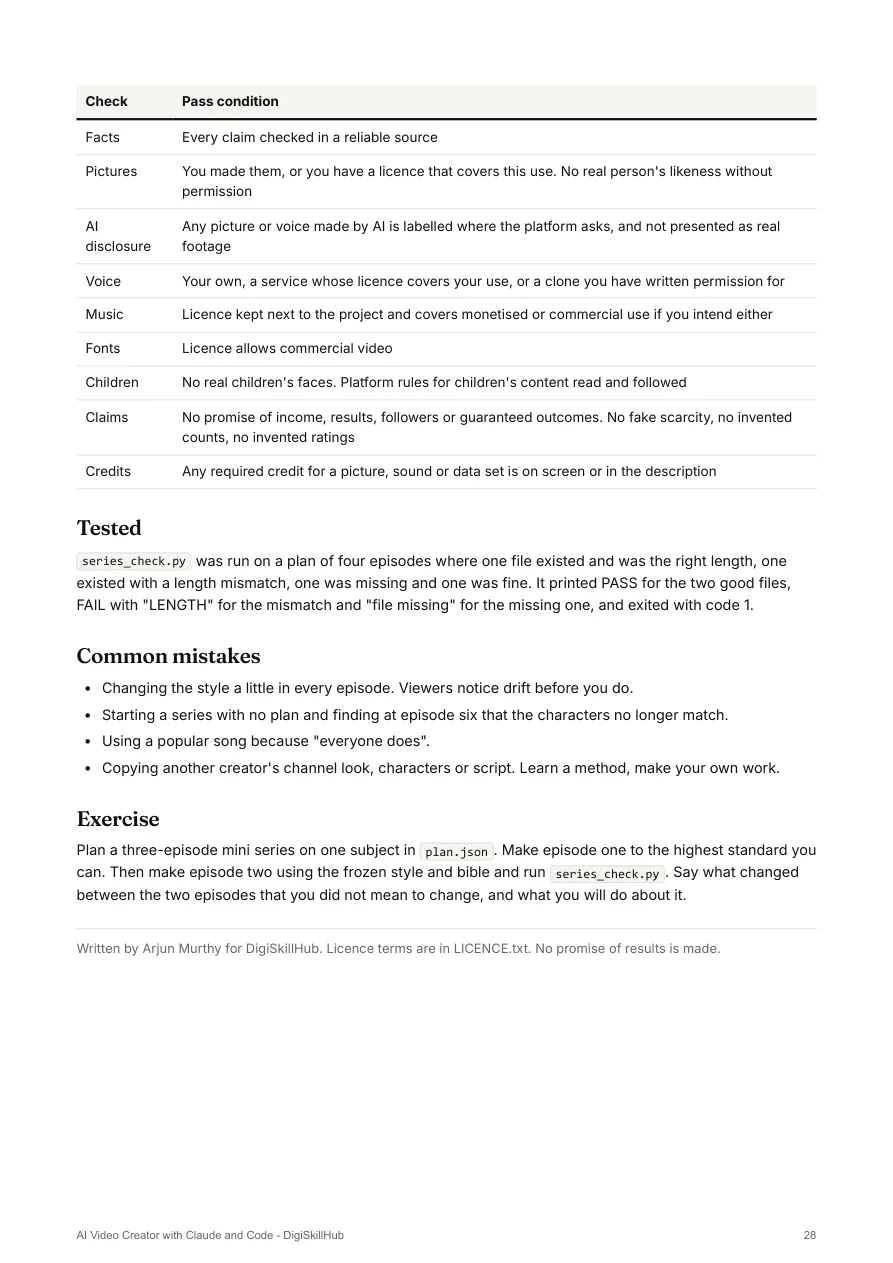
Page 28 of the course PDF: Check Pass condition Facts Every claim checked in a reliable source Pi
PDF page 28 of 28 A page from the included PDF, shown as it is

That is the real output. The files behind it are yours the moment you pay.

Get the AI Video Creator course
Everything inside

All 9 lessons, with their real length

Each lesson lists what it covers, its length in words and where it fits in the pipeline.

9 lessons

  1. Lesson 1. The pipeline and your setup

    850 words

    Understand the six stages that turn an idea into a finished video, install the free tools, and run the kit once so you have a working video on disk before you learn anything else.

    • The pipeline
    • What it costs, honestly
    • Steps
    • Tested
    • Common mistakes
    • Exercise
  2. Lesson 2. Write the script with Claude

    838 words

    Turn one idea into a scenes file that the kit can build: short lines, one idea per line, numbers written the way a voice will say them, and a hook in the first two seconds.

    • The shape of a good script
    • Length by format
    • Steps
    • Tested
    • Common mistakes
    • Exercise
  3. Lesson 3. Voice: one audio file per line

    868 words

    Get one clean audio file for every narration line, name them to match the scene ids, and check their length and quality before building.

    • Choose a voice source
    • Rules that save money
    • Steps
    • How the captions are timed
    • Tested
    • Common mistakes
    • Exercise
  4. Lesson 4. Visuals drawn in code

    865 words

    Make every scene's picture with Python and Pillow so spelling is always exact, the style is identical across scenes, and the cost is zero. Learn the safe-area rules that stop apps from covering your words.

    • Why draw in code
    • What the kit draws
    • Safe areas for vertical video
    • Steps
    • Tested
    • Common mistakes
    • Exercise
  5. Lesson 5. AI-generated visuals: the visual bible

    1,137 words

    Use an image or video generator without losing control. You will write a visual bible (one file that fixes style, characters and places), build every prompt from it with a script, and check every picture against a fixed list. This lesson is optional. Lessons ...

    • What this lesson needs and costs
    • The problem the bible solves
    • The bible
    • Prompt rules learned from production
    • Moving shots and hand-over frames
    • Steps
    • Honesty and safety
    • Tested
  6. Lesson 6. Motion with ffmpeg

    893 words

    Make still pictures move and join clips cleanly, using ffmpeg and the two small scripts in the kit. By the end you can do a push-in, a cross-fade between keyframes, a colour-fill reveal, a trim, a slow-down, and a change of shape from wide to vertical.

    • Motion you already have
    • Cross-fade between pictures: the product scroll video
    • The colour-fill reveal
    • Everyday ffmpeg moves
    • Steps
    • Tested
    • Common mistakes
    • Exercise
  7. Lesson 7. Read-along captions and sound

    992 words

    Add captions where each word lights up as it is spoken, put music under the voice so that it drops when the voice speaks, and set the final loudness to a standard level so your video is not too quiet or too loud next to others.

    • Captions
    • The sound mix
    • Music: where it comes from
    • Steps
    • Tested
    • Common mistakes
    • Exercise
  8. Lesson 8. Assemble, export and check

    807 words

    Export the right file for each place you publish, and run a check that finds the faults a tired eye misses: black frames, silence, wrong loudness, a file that is too large. Then build a whole folder of videos in one go.

    • Formats
    • The export settings the kit uses
    • The check
    • Steps
    • Tested
    • Common mistakes
    • Exercise
  9. Lesson 9. Five recipes, series, and publishing honestly

    1,046 words

    Apply the pipeline to five kinds of video, scale from one video to a series without losing consistency, and finish with a publishing checklist that protects you from the common legal and trust mistakes.

    • The five recipes
    • From one video to a series
    • Publishing checklist
    • Tested
    • Common mistakes
    • Exercise

Every group above is in the download, with the counts shown. Your files appear in My Library at once.

Get the AI Video Creator course

This is for you if

  • You make short videos, explainers or kids content and want a repeatable way to produce them.
  • You already use Claude and want to use it for scripts and code, with you in charge of the result.
  • You are comfortable running a command in a terminal and reading what it prints.
  • You want to keep the source of every video so you can fix and rebuild it.

This is not for you if

  • You want a point-and-click editor or a tool that makes videos for you.
  • You expect the course to include voices, music or pictures. None are included.
  • You want a promise of views, followers or income. We make none.
  • You will not install Python and ffmpeg.
Contents

What is inside

The course follows one pipeline for every kind of video: script, voice, visuals, motion and captions, sound, export and check. Each stage is a small file or a short command, so when something is wrong you know which stage to fix. Claude writes the script and the code. You decide, look and fix. The toolkit builds from one scenes file, so a typo in a headline is a one-line edit and a rebuild, not a re-export from an editor. The quality check reports black frames, silent stretches, loudness and file size, and it makes a contact sheet so you look at the video as well as trust the numbers.

Lessons: 9

Setup, scripting with Claude, voice, visuals in code, the visual bible for AI pictures, motion, captions and sound, export and checks, recipes and publishing

Toolkit scripts: 11

Builder, quality check, batch builder, series check, script checker, voice attacher, cross-fade maker, colour-fill reveal, prompt builder, setup check, stand-in voice maker

Example files

Vertical explainer, the same with a music bed, a wide song-style video, a visual bible, a shot list, and stand-in voice and music files

Demo reel

A 23 second silent showreel of the kinds of video the method makes. AI-generated clips are labelled on screen

PDF and Markdown: 28 pages

All nine lessons in one searchable PDF with bookmarks, and as separate Markdown files

TESTED.md

What was run and the results, and what was not run

Licence

Use for your own videos and your clients' videos. No resale of the course

You have seen the lessons and what is included. Build the first example within the hour.

Get the AI Video Creator course
What you can build

Five videos you can make with it

Each walk-through uses a recipe from lesson 9. You supply the voice, pictures and music, the course does not include them. No views or income are promised.

1

A 25 second vertical explainer

For a founder explaining one idea

  1. Run the setup check from lesson 1 so you know ffmpeg and Python are ready.
  2. Write the script with Claude using lesson 2, one line per scene.
  3. Record or generate one voice file per line, as lesson 3 explains.
  4. Run build.py on the scenes file, then qc.py to check length, loudness and black or silent stretches.

You end with: A 1080 by 1920 video with captions where each word lights up as it is spoken.

2

A video with a chart drawn in code

For a consultant with numbers to show

  1. Use the Pillow code in lesson 4 to draw a chart.
  2. Attach it to a scene.
  3. Read the frame back and fix overlap with the caption, as the lesson's tested note describes.
  4. Build and check.

You end with: A picture that is exactly your data, not a stock image.

3

A series with the same look in every episode

For a channel owner

  1. Write a visual bible as in lesson 5.
  2. Use series_check.py to confirm episodes share the settings.
  3. Build all episodes in one batch with build_all.py.
  4. Run the publishing checklist from lesson 9.

You end with: Episodes that look like one show.

4

Music that ducks under the voice

For anyone adding a music bed

  1. Open the example with music.
  2. Swap the stand-in music file for your own licensed track.
  3. Build. The toolkit lowers the music under speech and sets loudness to -16 LUFS.
  4. Listen once and adjust.

You end with: A balanced mix without a video editor.

5

Everyday ffmpeg moves

For anyone who cuts clips by hand

  1. Open lesson 6.
  2. Copy the command for the move you need: trim, slow, hold last frame, crop to vertical, blurred-fill vertical or one frame out.
  3. Run it on your clip.
  4. Keep the command in your notes.

You end with: A short list of commands you reuse.

Pick the walk-through you like best and start with it today.

Get the AI Video Creator course
How it works

From payment to using it, in three steps

Pay once

Card, Apple Pay or Google Pay. You get a invoice. No subscription follows.

Download

The file appears in My Library at once. Download it as often as you need.

Use it

Open it, adapt it to your work, keep it. No monthly meter.

Read a real one

Four excerpts from the course, as they are written

The parts in [square brackets] are the details you fill in. Read them and judge the standard for yourself.

Lesson 2, Write the script with Claude: the brief
Write a scenes file for a [vertical reel] of about [30] seconds on this idea: [idea]. Output ONLY valid JSON. Rules: 5 to 8 scenes. Scene 1 is a hook question. The last scene is a plain call to action with no promise of results. Write all numbers as words. If a fact needs a source, put the word CHECK at the end of that narration line.
Lesson 6, Motion with ffmpeg: a wide clip to vertical with a blurred fill
ffmpeg -i in.mp4 -filter_complex "[0:v]scale=1080:1920:force_original_aspect_ratio=increase,crop=1080:1920,boxblur=30[bg];[0:v]scale=1080:-2[fg];[bg][fg]overlay=(W-w)/2:(H-h)/2" -c:a copy out.mp4
Lesson 8, Assemble, export and check: what the check prints
PASS size: 1080x1920 / PASS duration: 25.7 s / PASS file: 1.59 MB / PASS audio track: True / PASS loudness: -16.0 LUFS (target -16.0) / PASS black stretches over 0.4 s: 0 / PASS silent stretches over 3 s: 0
Lesson 5, the visual bible: a locked character line
Mira: a girl of about eight with a short black bob, a yellow raincoat and red boots, round friendly face, empty hands. The same words go into every prompt that contains her, built by a script, so she looks the same in every picture.

These four are a small part of the nine lessons. The rest follow the same pattern: a goal, exact steps, what can go wrong, and what was tested.

Every lesson in the course is written to the standard you just read.

Get the AI Video Creator course
DigiSkillHub monogram
Who is behind this

Arjun Murthy

Runs DigiSkillHub

  • More than 15 years building artificial intelligence (AI), machine learning, embedded vision and real-time systems
  • Leads a software division
  • Completed the Advanced General Management Programme (AGMP) at IIM Ahmedabad

I am Arjun Murthy. I build artificial intelligence and embedded-vision systems for a living, more than 15 years of it, and I did the AGMP at IIM Ahmedabad. I make videos with these methods: kids stories, an epic series, product videos built in code, explainers drawn and captioned by a script. The lessons and every script in the toolkit are my own writing. They come from what I learned by making those videos, including what went wrong, such as a caption that landed on top of a picture until I looked at the frame. No lesson is copied from another course, and the course contains no other creator's prompts or files.

About Arjun Murthy

Subscription or one payment

Against free tutorials and against monthly editors

Free tutorials teach tools. This course teaches one repeatable pipeline.

Free video tutorialsMonthly video editing or AI video subscriptionsThis course, one payment
ApproachA different tool in each videoOne tool and its creditsOne pipeline, from script to export, in code
RepeatabilityYou redo the clicksCredits per videoRebuild from the source file any time
ChecksNonePreview onlyqc.py checks length, loudness, black and silent stretches
Try before spendingMostly yesOften a free tierStand-in voice and music files are included
Cost patternFreePaid monthlyOne payment, no renewal
Where free is betterLearning a single tool in depthPoint-and-click editingYou are fine with commands and code

This comparison is our honest reading of the options, not a test report. Check the free options yourself, they may fit you better.

Monthly subscription toolsDigiSkillHub
What you payA fresh payment every monthOne payment per product
If you stop payingAccess endsYour downloads stay yours
LimitsCredits and caps that run outFiles with no usage meter
What people told us29 of 185 price comments we read were about subscriptionsBuilt for exactly that complaint

Source: comments under competitors' AI-video and digital-product reels and videos on Instagram, Facebook and YouTube, read in November 2026.

Price

AI Video Creator with Claude and Code: A Working Course and Toolkit

How the price moves
  • Launch price $12 until 07 December 2026
  • Regular price $18 after that
$18 $12

No hidden charges.

Get the AI Video Creator course
Secure payment GST invoice Instant delivery 7-day refund
Buying from us

What you can count on

  • Secure paymentStripe: card, Apple Pay and Google Pay. We never see or store your card.
  • InvoiceA proper invoice for every order, in My Library.
  • Instant downloadYour files appear in My Library as soon as payment clears.
  • 7-day refundNot what you expected? Write to us within 7 days. Refund policy.
  • Support[email protected]. We reply within 24 to 48 hours.
  • Who sells thisDigiSkillHub, No. 33, 131/1, 1st Cross, Shastha Layout, Rayasandra, Bengaluru, Karnataka 560099, India. Contact.

Questions about what happens after you pay are answered just below.

Get the AI Video Creator course
After you pay

Delivery and support, in plain words

  1. 1. PayStripe: card, Apple Pay or Google Pay. You see the full price at checkout. No subscription follows.
  2. 2. It appears in My LibraryNothing is posted. When the payment is confirmed the product is added to your account, usually within a minute.
  3. 3. DownloadPress Download. Each press makes a private link that works for 5 minutes and one download. If it expires, press again. There is a download limit to protect the files, and we reset it on request.
  4. 4. Use itThe licence file is inside. It is short. Read it, then use the product for yourself and, where the licence says so, for your clients.
  5. 5. Need helpWrite to [email protected]. We reply within 24 to 48 hours. If the file is damaged or missing, fixing it is the normal remedy.
7
day refund

7-day refund

Open it, try a few and see for yourself. If it is not what you expected, ask for a refund within 7 days and you get the full amount back.

  • Email [email protected] within 7 days of the purchase date and ask for the refund.
  • You get the full amount you paid for that product. You do not need to prove anything or give a reason.
  • We approve a valid request within 2 working days. Banks usually take 5 to 10 working days to show the money.
  • After a refund the licence for that product ends, so please delete your copies. Read the full refund policy.
From buyers

New product: be among the first buyers

There are no buyer reviews to show yet, and we will not invent any. Reviews appear here only after a real buyer writes one and we approve it. If it is not useful to you, the 7-day refund applies.

Before you buy

Questions people ask

What exactly do I download?

One ZIP with a 28-page searchable PDF of the nine lessons, the same lessons as Markdown, the toolkit scripts and example files, a 23 second demo reel, a TESTED file and the licence.

How fast do I get it?

Instantly. The ZIP appears in My Library as soon as payment clears, and you can download it again whenever you need it.

What do I need to install, and what does it cost?

Python 3.9 or newer, the Pillow library and ffmpeg, all free. One lesson also uses numpy and scipy, also free. You need Claude to write scripts and code, on your own plan. A voice is optional: record yourself for free, or use a cloud text-to-speech service on its own plan. The kit includes stand-in test files so you can finish the whole chain first.

Do I need to know how to code?

No. You need to open a terminal, run a command and read what it says. Claude writes the scripts. The lessons give you the exact commands and explain every field in the scenes file.

Do I need an AI image or video generator?

No. Lessons 1 to 4 and 6 to 9 give finished videos without one, using pictures drawn in code. Lesson 5 explains how to use a generator with a visual bible if you choose to. It names no service, and any such service is paid for with your own account.

Which computers does it work on?

It was built and tested on Windows 11. The scripts use standard Python and ffmpeg, so they should work on a Mac or Linux, but the caption font setting differs there and that was not tested. TESTED.md lists exactly what was and was not run.

Is the music or the voice included?

No. The kit includes a plain test tone for the voice and a plain test tone for music, so you can check the pipeline. Lesson 7 shows how to check that a music track's licence covers your use.

Will this guarantee views, followers or income?

No. It teaches a method for making videos. It makes no promise about how any video performs.

Can I resell the course?

No. You may use the toolkit to make videos for yourself and your clients and you own those videos. You may not resell, share or publish the course, the PDF, the toolkit or the demo reel.

Is there a refund?

Yes. Ask within 7 days of buying and you get the full amount back. Open lesson 1, run the setup check and build the first example. If it is not what you expected, write to us.

What exactly was tested?

On 23 November 2026, on one Windows 11 laptop: the setup check, three example builds with the quality check, the colour-fill reveal, cross-fades and six everyday ffmpeg moves. TESTED.md lists what passed and what was not tested.

Do I need to pay for voices, pictures or music?

The course does not include voices, music or pictures. Stand-in files let you test the chain. For real work you bring your own, from any source you have the right to use.

Is the toolkit hard to run?

You run a few commands in a terminal. The lessons give each command exactly. If you will not install Python and ffmpeg, this is not for you.

Can I publish the videos I make?

Yes. You own the videos you make. Third-party material you add, such as voices or music, stays under its own terms.

Is there a way to see a lesson first?

The PDF pages above are real pages. The reel is the real output.

Is the payment safe?

Payment is taken by Razorpay in India (UPI, card, net banking) and by Stripe elsewhere (card, Apple Pay, Google Pay). Your card or UPI details go to the gateway. DigiSkillHub never sees or stores them.

Will I be charged every month?

No. It is one payment for the product. There is no subscription, no renewal and no card kept on file by us.

How do I get the files after paying?

The product is added to My Library as soon as the payment is confirmed, usually within a minute. Sign in, open My Library and press Download. Each Download button makes a private link that works for 5 minutes and for one download, so if it expires you press the button again.

What if the download does not arrive?

If the product is not in My Library 30 minutes after a successful payment, write to us with your order number or payment reference. We either fix the access or refund the order. A damaged or missing file is fixed first, that is the normal remedy.

Exactly how does the refund work?

Email us within 7 days of the purchase date and ask for the refund. You get the full amount you paid for that product and you do not have to justify the request. We approve a valid request within 2 working days. Banks usually take 5 to 10 working days to show the money. After the 7 days we do not refund, except for a damaged or missing file we cannot fix, a double charge, or where the law requires it.

Do I get an invoice?

Yes. Every order has an invoice in My Library.

Can I share my copy with a colleague or friend?

No. The licence is for the person or business that bought it, and each extra person needs their own copy. The licence file inside the download says exactly what you may do, and it is short enough to read before you buy.

Who am I buying from?

DigiSkillHub, run by Arjun Murthy. The legal name, address and contact details are in the footer of every page and on the Contact page. Support is by email and we reply within the time shown on the Contact page.


Get the free AI Builder Cheat Sheet

Eight pages, free. Prompt formulas for Claude and ChatGPT, ten prompts for scroll-effect website sections, ffmpeg commands for making video with code, and free AI tools worth trying.

Make finished videos with Claude and code, from script to captions to export.

Get the AI Video Creator course $12 No hidden charges · 7-day money-back guarantee Secure checkout via Stripe (card, Apple Pay, Google Pay)