Skip to content
View in: India (₹) USA ($) Europe (€)
Menu
329 prompts and three tested starter pages for 3D and scroll-driven websites, made for an AI assistant.

One prompt. A moving 3D website.

329 prompts for Three.js and GSAP scroll scenes, with three starter pages that already run. Paste a prompt into Claude, ChatGPT, Cursor or Gemini and get code you can open in a browser.

$9
One-time payment · instant download
Founding price for the first 100 buyers, 99 left. Regular price $15.

Stripe secure checkout

Secure payment GST invoice Instant delivery 7-day refund
Pages built from prompts in this pack. The video is real screen capture, not an animation made for the ad.
  • 329 original prompts in 17 chapters: scene setup, lighting, materials, camera paths, product viewers, scroll with GSAP ScrollTrigger, particles, shaders, backgrounds, 3D text, interactions, mobile performance, accessibility, debugging, deployment
  • A short guide on how to brief an AI assistant for 3D work, with a reusable instruction block and a six step worked example
  • Three working starter pages in plain HTML: an orbit product stage, a scroll story and a particle and shader backdrop. Tested in headless Chromium with zero console errors
  • Debugging prompts for the problems that stop most people: black screens, missing models, washed out colours, jumpy scroll, hot phones
  • PDF (45 pages, searchable), Markdown and CSV. No framework, no build step
  • Founding-member price for the first 100 buyers. Launch price ends 07 December 2026

We read 3,388 comments under other creators' videos before we built this.

Of the 185 that mentioned price, 29 complained about monthly subscriptions and 51 asked for something free.

Get the free AI Builder Cheat Sheet

Eight pages, free. Prompt formulas for Claude and ChatGPT, ten prompts for scroll-effect website sections, ffmpeg commands for making video with code, and free AI tools worth trying.

Does this sound familiar

The problem this solves

  • You ask an AI assistant for a 3D web page and get code that shows a black screen.
  • Tutorials assume a framework, a build tool or a lot of mathematics.
  • Your 3D page looks good on your computer and runs hot or stutters on a phone.
  • You are not sure what to ask for, so you ask for something vague and get something vague.
What changes
  • A scene on screen within the first hour, built from a starter page that already runs.
  • A way to ask for lighting, materials, camera moves and scroll effects in words the assistant follows.
  • A page that is fast on phones, readable and respects people who turn motion off.
  • A checklist to run before you publish.
The problem

Why AI-built 3D websites come out flat and generic

Ask an AI assistant for a 3D website and you usually get one of two things. A black canvas with an error in the console, or a grey cube turning slowly on a grey background, the same demo you have seen a hundred times.

The assistant is rarely the cause. The request is. "Make me a cool 3D landing page" says nothing about the Three.js version, the camera, the lights, the material, how the page should move as you scroll, or which phone it has to run on. The assistant fills every one of those gaps with its most common default, so you get the most common result.

Lighting, material and camera path are separate decisions. Asked for in one sentence they blur into one generic scene. Asked for one at a time, each can be tuned until it looks the way you want.

Phones add a second problem. A scene that runs smoothly on a laptop can stutter or heat up a mid-range phone, and nobody tells you until you open the link on one.

The mechanism

How the prompts are built for Three.js and GSAP scroll scenes

Every prompt in the pack changes one thing. A light. A material. A camera move. A scroll timeline. A shader. A performance cap. Small steps mean small mistakes, and when a step fails you know which one.

The scroll chapter is a good example. Its prompts name the library, GSAP 3.13.0 with ScrollTrigger, ask for scrub, ask for the easing to be none so the motion follows the scrollbar, and ask the assistant to drive the render from GSAP's ticker so the scene and the timeline stay in step. You fill in the brackets, such as [object] and [degrees], and the assistant has no gaps left to guess at.

A short guide at the front of the pack teaches the structure behind all 329 prompts. Say the outcome, state the stack and the versions, list the constraints, paste your existing code and say what check you will run. It includes a reusable instruction block and a six step worked example.

  • Pinned versions in the prompts, so the code the assistant writes matches the libraries on your page
  • One change per prompt, so you can see what each step did
  • Three starter pages that already run, so a prompt that says "my scene" has a scene to point at
  • Debugging prompts for the failures that stop most people: black screen, nothing on mobile, jumpy scroll
What you get, counted

329 prompts in 17 chapters, counted from the files

These are the chapters and the number of prompts in each, taken from the CSV file inside the pack. The total is 329.

  • Chapter 01, Scene setup and page structure: 20 prompts
  • Chapter 02, Lighting and shadows: 20 prompts
  • Chapter 03, Materials and textures: 20 prompts
  • Chapter 04, Camera and camera paths: 20 prompts
  • Chapter 05, GLTF product viewers, for your own models: 22 prompts
  • Chapter 06, Scroll driven 3D with GSAP ScrollTrigger: 22 prompts
  • Chapter 07, Particles: 18 prompts
  • Chapter 08, Shaders: noise, gradients and displacement: 22 prompts
  • Chapter 09, WebGL backgrounds: 17 prompts
  • Chapter 10, 3D text and logos: 16 prompts
  • Chapter 11, Interactions: orbit, hover and drag: 20 prompts
  • Chapter 12, Mobile performance: 24 prompts
  • Chapter 13, Accessibility and reduced motion: 16 prompts
  • Chapter 14, Debugging and fix prompts: 24 prompts
  • Chapter 15, Deployment and delivery: 14 prompts
  • Chapter 16, Page design around 3D: 18 prompts
  • Chapter 17, Working with an AI coding assistant on 3D pages: 16 prompts
  • Three starter pages in plain HTML: an orbit product stage, a scroll story and a particle and shader backdrop
  • A 45-page searchable PDF, the same prompts as Markdown and CSV, a README and the licence
Straight talk

What this pack is not

It is not a course, a video series or a done-for-you website. It is a set of written prompts, a short guide and three small working pages. You need an AI assistant to give the prompts to.

It does not include 3D models, photographs or textures. The starter pages build their shapes in code. The product viewer prompts are written for your own models, and chapter 5 has a checklist for confirming you have the right to use one.

It makes no promise about how your page will perform or rank. The prompts give you a clear first draft. You still check the result on real phones.

If this describes the page you want to build, the pack is one payment with instant download and a 7-day refund.

Get the 3D Prompt Pack
See every output

Real pages built from real prompts in the pack

Each clip below is a page an AI assistant wrote from one prompt in the pack. The prompt is printed under it, word for word. Your result will differ with your assistant, your brackets and your follow-up requests, but this is the kind of page a single prompt returns.

Pinned 3D section
Pin the canvas for the length of a section while text panels scroll past, and animate the object between [number] states. Provide the HTML structure, the ScrollTrigger settings and the timeline.
Prompt C06-002, chapter 6. Scroll-pinned 3D knot: canvas stays pinned while three text panels scroll past and the object changes state (blue, gold, green)
Grid and perspective floor
Create a retro perspective grid floor that scrolls toward the horizon with a subtle glow, using a shader or a line grid. Include a horizon fade and a speed tied to scroll.
Prompt C09-004, chapter 9. Retro synthwave perspective grid floor racing toward a striped sun, glow and horizon fade (camera/depth)
Exploded view
Create an exploded view of my model that moves the named parts [part names] outward along their own axes when a button is pressed and back again. Describe how to find the axis for each part.
Prompt C05-007, chapter 5. Exploded view: a camera model's lens, body, grip and shutter ring slide apart along their own axes
Simplex noise displacement
Displace the vertices of a sphere with noise in the vertex shader to make a living blob, and recompute normals approximately so the lighting still works. Give parameters for amplitude and speed.
Prompt C08-004, chapter 8. Living 3D blob: noise-displaced sphere in a vertex shader with live lighting (3D hero object)
Galaxy or spiral
Generate a spiral galaxy with [number] points using polar coordinates, random spread, colour from centre to edge and slow rotation. Give tweakable parameters in one object.
Prompt C07-007, chapter 7. Spiral galaxy of 60,000 particles, colour from core to edge, slow rotation
Liquid blobs
Create a liquid metaball style background with [number] blobs that merge, using a fragment shader with a smooth minimum. Give colours, speeds and a quality setting.
Prompt C09-007, chapter 9. Liquid glass-like gradient metaballs merging and splitting in a fragment shader
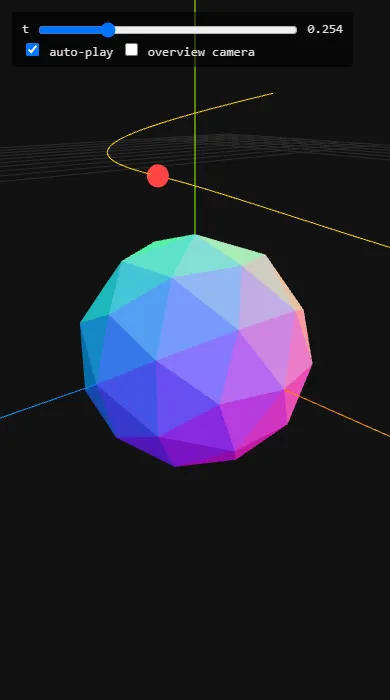
Page built by an AI assistant from prompt C04-004 (Camera path along a curve)
Camera path along a curve
Make the camera follow a CatmullRomCurve3 through these points: [list of points], looking at [target], with the position driven by a value from 0 to 1. Write the code and a debug line to show the curve.
Prompt C04-004. Screenshot of the page the assistant wrote, taken on a 390 pixel wide phone screen.
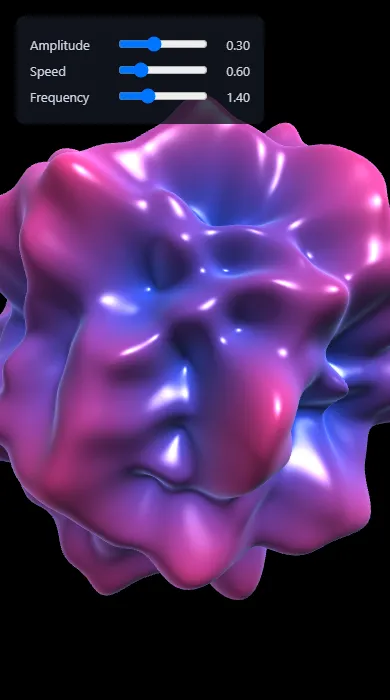
Page built by an AI assistant from prompt C08-004 (Simplex noise displacement)
Simplex noise displacement
Displace the vertices of a sphere with noise in the vertex shader to make a living blob, and recompute normals approximately so the lighting still works. Give parameters for amplitude and speed.
Prompt C08-004. Screenshot of the page the assistant wrote, taken on a 390 pixel wide phone screen.
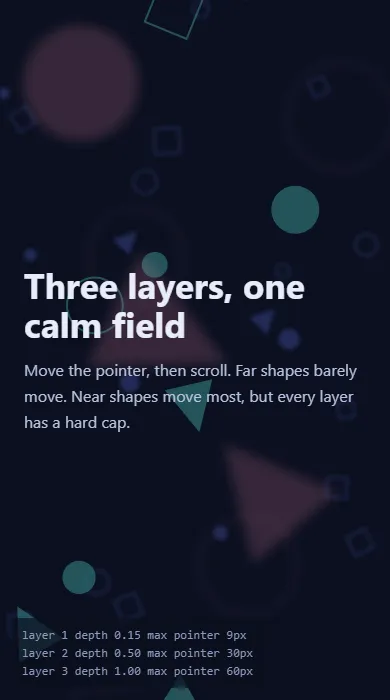
Page built by an AI assistant from prompt C09-012 (Three layer parallax)
Three layer parallax
Build a background with three depth layers of shapes that move at different speeds with the pointer and scroll. Give layer depth values and limits so it never feels dizzy.
Prompt C09-012. Screenshot of the page the assistant wrote, taken on a 390 pixel wide phone screen.
Page built by an AI assistant from prompt C07-007 (Galaxy or spiral)
Galaxy or spiral
Generate a spiral galaxy with [number] points using polar coordinates, random spread, colour from centre to edge and slow rotation. Give tweakable parameters in one object.
Prompt C07-007. Screenshot of the page the assistant wrote, taken on a 390 pixel wide phone screen.

That is the real output. The files behind it are yours the moment you pay.

Get the 3D Prompt Pack
Everything inside

All 17 chapters, counted from the files

Every chapter with its real prompt count, three titles from it and one prompt shown in full.

329 prompts in 17 chapters

  1. Chapter 01: Scene setup and page structure

    20 prompts
    • Single file starter scene
    • Explain a minimal scene
    • Import map setup
    Propose a folder and file structure for a small 3D website with no build step, containing index.html, a js folder, a models folder, a textures folder and a README. Say what goes where and why.C01-011
  2. Chapter 02: Lighting and shadows

    20 prompts
    • Three point lighting
    • Soft studio light
    • Warm sunset light
    Explain tone mapping in Three.js. Show the effect of NoToneMapping, ACESFilmic and AgX on [kind of scene] and give the settings I should start with, with the reason.C02-011
  3. Chapter 03: Materials and textures

    20 prompts
    • Choose the right material
    • Brushed metal material
    • Glass material
    Make parts of [object] glow using emissive colour and emissiveIntensity, then add a subtle bloom effect through post processing. Warn me about the cost and give a version without bloom.C03-011
  4. Chapter 04: Camera and camera paths

    20 prompts
    • Choose a field of view
    • Orbit around an object
    • Cinematic camera move
    Build a simple walk through of [room or corridor] with pointer lock and WASD on desktop and a touch joystick on mobile. Keep the collision very simple and explain its limits.C04-011
  5. Chapter 05: GLTF product viewers (use your own models)

    22 prompts
    • Load a GLTF model
    • Draco and meshopt compression
    • Model not showing
    The product comes in [number] shapes, each a separate GLB. Write a loader that swaps them with a fade, caches loaded models and disposes of unused ones to protect memory.C05-012
  6. Chapter 06: Scroll driven 3D with GSAP ScrollTrigger

    22 prompts
    • Basic scroll scrubbed rotation
    • Pinned 3D section
    • Timeline with labels
    Add a chapter menu that scrolls to each section and highlights the active one while scrolling. Handle the case where the user presses a menu item while the timeline is mid way.C06-012
  7. Chapter 07: Particles

    18 prompts
    • Basic particle field
    • GPU driven particles
    • Particles that follow the pointer
    On click, emit a short burst of particles from the click position in 3D, with gravity and fading, then recycle them. Use a fixed pool of [number] particles so no memory is created per click.C07-010
  8. Chapter 08: Shaders: noise, gradients and displacement

    22 prompts
    • First custom shader
    • Animated gradient background
    • Value noise and fBm
    Create soft overlapping blobs of colour moving slowly, like a blurred gradient mesh, using one fragment shader and [number] moving points. Provide a palette and the settings for subtlety.C08-012
  9. Chapter 09: WebGL backgrounds

    17 prompts
    • Full screen shader background
    • Floating shapes background
    • Aurora effect
    Add a low power mode to the background that reduces frame rate to [number] frames per second and resolution scale to [value] when on battery saver or when the frame time is high. Provide the detection and fallback code.C09-009
  10. Chapter 10: 3D text and logos

    16 prompts
    • Extruded text
    • Text with SDF
    • SVG logo to 3D
    Suggest materials for 3D text for [brand mood]: polished gold, frosted glass, matte clay and neon. Provide the settings for each and what lighting suits them.C10-009
  11. Chapter 11: Interactions: orbit, hover and drag

    20 prompts
    • Hover highlight with raycaster
    • Click to select
    • Drag objects on a plane
    Add an HTML range slider that controls [property such as explode amount or time of day]. Provide the label, the keyboard behaviour and a smooth update without lag.C11-011
  12. Chapter 12: Mobile performance

    24 prompts
    • Performance audit
    • Cap the pixel ratio
    • Measure frame rate
    Explain how a 3D canvas affects Largest Contentful Paint, Cumulative Layout Shift and Interaction to Next Paint, and give changes that protect them: reserved size, poster image, deferred start and short tasks.C12-013
  13. Chapter 13: Accessibility and reduced motion

    16 prompts
    • Prefers reduced motion pattern
    • Accessible canvas description
    • Keyboard access
    My hotspots only show on hover. Create an accessible alternative: a list of the same information in HTML, reachable by keyboard, linked to the 3D view, and announced politely when selected.C13-009
  14. Chapter 14: Debugging and fix prompts

    24 prompts
    • Black screen
    • Nothing happens on mobile
    • Console error reading
    Frame rate is fine at first then drops. Suggest causes such as thermal throttling, growing arrays, leaking objects and expensive garbage collection, and how to record a performance profile to prove it.C14-013
  15. Chapter 15: Deployment and delivery

    14 prompts
    • Static hosting steps
    • Compress and cache assets
    • Own the library files
    Explain what to check for privacy when a 3D page loads scripts from a CDN and uses analytics. Draft a short note for visitors and a checklist for a lawyer to confirm. This is not legal advice.C15-008
  16. Chapter 16: Page design around 3D

    18 prompts
    • 3D hero section design
    • When not to use 3D
    • Storyboard a scroll story
    Design navigation for a long immersive page: sticky menu, progress indicator, section labels and a way to skip the animation. Provide the HTML and CSS and describe the behaviour on mobile.C16-010
  17. Chapter 17: Working with an AI coding assistant on 3D pages

    16 prompts
    • Project brief for the assistant
    • Ask for a plan first
    • Small steps prompt
    Ask the assistant to review its own change as a sceptical reviewer: list bugs, performance risks, accessibility gaps and untested paths, and fix the real problems. Write the prompt for [paste code].C17-009

Every group above is in the download, with the counts shown. Your files appear in My Library at once.

Get the 3D Prompt Pack

This is for you if

  • You build websites for yourself or for clients and want 3D or scroll-driven sections without writing Three.js from scratch.
  • You already use Claude, ChatGPT, Cursor or Gemini and want to ask for 3D work in a way that returns code that runs.
  • You want a working starting point, not a blank file. Three starter pages run as soon as you open them.
  • You care about phones, reduced motion and loading speed, and want prompts that ask for them by name.

This is not for you if

  • You want a finished website or a done-for-you service. This is prompts, a guide and three starter pages.
  • You need ready-made 3D models, photographs or textures. None are included.
  • You want a promise of income, rankings or sales. We make none.
  • You will not use an AI assistant. Every prompt is written to be given to one.
Contents

What is inside

The pack works in three layers. The guide teaches how to brief an assistant: the outcome, the stack and versions, the constraints, your existing code and the check you will run. The three starter pages give you something real to build on, so prompts that say 'my scene' have a scene to point at. The 329 prompts then change one thing at a time: a light, a material, a camera path, a scroll timeline, a shader, a performance cap. Smaller steps mean smaller mistakes, and the debugging chapter shows how to ask when a step fails.

Prompts: 329

Original prompts in 17 chapters, with [placeholders] for your details

How to use these prompts: 9 pages

Setup, the anatomy of a good 3D prompt, a reusable instruction block, a worked example, a glossary, performance and accessibility rules and a pre-publish check

Starter pages: 3

Orbit product stage, scroll story with GSAP, particles with a shader backdrop. Plain HTML, Three.js 0.160.0 and GSAP 3.13.0 from public CDNs, no third-party models or images

PDF: 45 pages

Searchable, with a contents page and a bookmark for every chapter

Markdown and CSV files

The same prompts to copy from and filter. CSV columns: id, chapter, title, prompt

Licence

Use for your own sites and your clients' sites. No resale of the pack

You have seen the chapters and the counts. Open the pack today and run the first starter page within the hour.

Get the 3D Prompt Pack
What you can build

Five things you can build with it

Each walk-through uses prompts and starter pages that are actually in the pack. None of this is a promise about what you will earn. It shows the steps.

1

A scroll-pinned product story

For a freelancer making a launch page

  1. Open starter page 02, the scroll story, in your browser. It runs as it is and shows pinned 3D with three text panels.
  2. Open chapter 06 and take prompt C06-002, which pins the canvas while panels scroll past. Replace [object] with your product shape and the three states with your colours.
  3. Paste the instruction block from the guide, then the prompt, then your page code. Ask the assistant to change only the timeline.
  4. Open the result on a real phone. If it stutters, use a prompt from chapter 12 to cap the pixel ratio and lower the particle count.

You end with: A page where the object changes as the visitor scrolls, in plain HTML you can host anywhere.

2

A particle galaxy behind your hero text

For a founder who wants a striking home page

  1. Take prompt C07-007 from chapter 07, the spiral galaxy with tweakable parameters in one object.
  2. Set the colour from centre to edge to your brand colours, and ask for slow rotation only.
  3. Add a prompt from chapter 13 so the motion stops when the visitor has reduced motion switched on.
  4. Place your headline and button over the canvas and test the contrast.

You end with: A dark animated background that respects reduced motion.

3

An exploded view of your own product

For a maker or an agency with a GLB model

  1. Export your model as a GLB file. The pack does not include models, so this is your own file.
  2. Use chapter 05 prompt C05-007, which moves named parts outward along their own axes when a button is pressed.
  3. Give the assistant your real part names in the brackets, for example lens, body, grip.
  4. Ask a follow-up from chapter 05 for labels that follow each part.

You end with: A viewer where a button pulls the product apart and puts it back.

4

A living blob or liquid background from a shader

For a designer who wants motion without video files

  1. Take prompt C08-004 from chapter 08, which displaces a sphere with noise in the vertex shader.
  2. Ask for the amplitude and speed as two named values at the top of the file.
  3. Try prompt C09-007 from chapter 09 for the metaball background and compare.
  4. Use a chapter 12 prompt to add a quality setting so phones get the lighter version.

You end with: Two shader backgrounds you can tune with a few numbers, and no video file to host.

5

Fix a black screen or a hot phone

For anyone whose AI-written scene does not work

  1. Open chapter 14, the debugging prompts, and pick the one for a black screen.
  2. Paste the console error and your code into the prompt where it says so.
  3. If the page works on a laptop but heats a phone, switch to chapter 12 and ask for the pixel ratio and frame cap.
  4. Re-test on the phone and keep the working version.

You end with: A short, repeatable way to get unstuck instead of re-asking the assistant the same vague question.

Pick the walk-through you like best and start with it today.

Get the 3D Prompt Pack
How it works

From payment to using it, in three steps

Pay once

Card, Apple Pay or Google Pay. You get a invoice. No subscription follows.

Download

The file appears in My Library at once. Download it as often as you need.

Use it

Open it, adapt it to your work, keep it. No monthly meter.

Read a real one

Four prompts shown in full, exactly as they are in the pack

Nothing is trimmed. The parts in [square brackets] are the details you fill in. Read them and judge the standard for yourself.

Chapter 06, Scroll driven 3D: Basic scroll scrubbed rotation (C06-001)
Rotate my [object] by [degrees] as the user scrolls through the page, using GSAP 3.13.0 ScrollTrigger with scrub. Use ease none, tie the render to GSAP's ticker and explain why.
Chapter 02, Lighting and shadows: Animate light with scroll (C02-008)
Write code that moves a point light and changes its colour as the user scrolls through [number] sections. Use GSAP ScrollTrigger with scrub and keep the light intensity within a safe range.
Chapter 12, Mobile performance: Performance audit (C12-001)
Audit this Three.js page for mobile performance: [paste code or describe]. Rank the likely problems by effect: pixel ratio, draw calls, triangles, textures, shadows, post processing and overdraw. Say how to measure each.
Chapter 14, Debugging and fix prompts: Black screen (C14-001)
My Three.js page shows a black or empty canvas. Here is the code: [paste] and the console output: [paste]. Give an ordered checklist of causes with the quick test for each, then identify the most likely cause in my code.

These four are 4 of the 329. The rest follow the same pattern: one clear change, versions named, a check you can run.

Every prompt in the pack is written to the standard you just read.

Get the 3D Prompt Pack
DigiSkillHub monogram
Who is behind this

Arjun Murthy

Runs DigiSkillHub

  • More than 15 years building artificial intelligence (AI), machine learning, embedded vision and real-time systems
  • Leads a software division
  • Completed the Advanced General Management Programme (AGMP) at IIM Ahmedabad

I am Arjun Murthy. I build artificial intelligence and embedded-vision systems for a living, more than 15 years of it, and I did the AGMP at IIM Ahmedabad. I build real-time vision and graphics software, and I use these methods when I build 3D pages for my own products: pinned versions, a capped pixel ratio, reduced motion support and a test in a headless browser before anything ships. I wrote every prompt in this pack myself, from how I brief and test AI systems at work. No prompt is copied from another collection.

About Arjun Murthy

Subscription or one payment

Against the free options and against monthly tools

Free material is good and we use it ourselves. This is where a paid pack earns its place and where it does not.

Free tutorials and forum postsMonthly 3D or site-builder subscriptionsThis pack, one payment
What you getExplanations of the library, scattered across many sitesA tool with its own editor and its own look329 prompts written for an AI assistant, plus 3 starter pages
Pinned versionsOften not stated, so code breaks on a newer releaseNot your code, so not applicablePrompts name Three.js 0.160.0 and GSAP 3.13.0
Phones and reduced motionRarely coveredDepends on the toolA whole chapter each, 24 and 16 prompts
You own the codeYesOften locked to the tool or the planYes, plain HTML and JavaScript, no framework
Cost patternFree, but your timePaid every monthOne payment, no renewal
Where free is betterLearning how Three.js works underneathVisual editing with no code at allThis pack assumes you will use an AI assistant

This comparison is our honest reading of the options, not a test report. Check the free options yourself, they may fit you better.

Monthly subscription toolsDigiSkillHub
What you payA fresh payment every monthOne payment per product
If you stop payingAccess endsYour downloads stay yours
LimitsCredits and caps that run outFiles with no usage meter
What people told us29 of 185 price comments we read were about subscriptionsBuilt for exactly that complaint

Source: comments under competitors' AI-video and digital-product reels and videos on Instagram, Facebook and YouTube, read in November 2026.

Price

3D Website Prompt Pack: Build Immersive Sites with AI

How the price moves
  • Founding price $9 for the first 100 buyers (99 left)
  • Launch price $12 until 07 December 2026
  • Regular price $15 after that
$15 $9

No hidden charges.

Get the 3D Prompt Pack
Secure payment GST invoice Instant delivery 7-day refund
Buying from us

What you can count on

  • Secure paymentStripe: card, Apple Pay and Google Pay. We never see or store your card.
  • InvoiceA proper invoice for every order, in My Library.
  • Instant downloadYour files appear in My Library as soon as payment clears.
  • 7-day refundNot what you expected? Write to us within 7 days. Refund policy.
  • Support[email protected]. We reply within 24 to 48 hours.
  • Who sells thisDigiSkillHub, No. 33, 131/1, 1st Cross, Shastha Layout, Rayasandra, Bengaluru, Karnataka 560099, India. Contact.

Questions about what happens after you pay are answered just below.

Get the 3D Prompt Pack
After you pay

Delivery and support, in plain words

  1. 1. PayStripe: card, Apple Pay or Google Pay. You see the full price at checkout. No subscription follows.
  2. 2. It appears in My LibraryNothing is posted. When the payment is confirmed the product is added to your account, usually within a minute.
  3. 3. DownloadPress Download. Each press makes a private link that works for 5 minutes and one download. If it expires, press again. There is a download limit to protect the files, and we reset it on request.
  4. 4. Use itThe licence file is inside. It is short. Read it, then use the product for yourself and, where the licence says so, for your clients.
  5. 5. Need helpWrite to [email protected]. We reply within 24 to 48 hours. If the file is damaged or missing, fixing it is the normal remedy.
7
day refund

7-day refund

Open the guide, run a starter page and try a few prompts. If it is not what you expected, ask for a refund within 7 days and you get the full amount back.

  • Email [email protected] within 7 days of the purchase date and ask for the refund.
  • You get the full amount you paid for that product. You do not need to prove anything or give a reason.
  • We approve a valid request within 2 working days. Banks usually take 5 to 10 working days to show the money.
  • After a refund the licence for that product ends, so please delete your copies. Read the full refund policy.
From buyers

New product: be among the first buyers

There are no buyer reviews to show yet, and we will not invent any. Reviews appear here only after a real buyer writes one and we approve it. If it is not useful to you, the 7-day refund applies.

Before you buy

Questions people ask

What exactly do I download?

One ZIP with a 45-page searchable PDF containing the guide and 329 prompts, the same prompts as Markdown and CSV, a starter-code folder with three working pages, a README and the licence.

How fast do I get it?

Instantly. The ZIP appears in My Library as soon as payment clears, and you can download it again whenever you need it.

Which AI tools do these work with?

Any assistant that takes a written instruction, including Claude, ChatGPT, Cursor and Gemini. The prompts are plain text, so they do not depend on one product. A paid plan of your assistant may help on long work, and that cost is yours.

Do I need to know how to code?

Not to start. You need to open a folder, run a local server with one command and describe what you see. The guide explains the setup, and the prompts are written for an AI assistant that writes the code. Reading the starter pages teaches the rest.

Do the starter pages need internet?

Yes, the first time. They load Three.js 0.160.0 and GSAP 3.13.0 from public content delivery networks. The prompts in chapter 15 explain how to host those files yourself.

Are the 3D models included?

No. The starters build their objects in code and contain no third-party models, photographs or textures. The product viewer prompts are written for your own models, and chapter 5 has a checklist for confirming you have the right to use one.

Will my page be fast on phones?

The starters cap the pixel ratio, pause when the tab is hidden and respect reduced motion, and a whole chapter covers phone performance. Speed still depends on your assets and your device targets, so test on real phones.

Will this guarantee results?

No. The prompts give a good first draft and a clear structure. The quality of what you get still depends on the details you put in the brackets and on checking the output yourself.

Can I resell the prompts?

No. You may use them for your own work and your clients' work. You may not resell, share or publish the pack, or a lightly edited copy of it, as a pack of your own.

Is there a refund?

Yes. Ask within 7 days of buying and you get the full amount back. Open the guide, run a starter page and try a few prompts first. If it is not what you expected, write to us.

Will the prompts work with the newest version of Three.js?

The prompts name Three.js 0.160.0 and GSAP 3.13.0 so the code matches the libraries on your page. You can ask the assistant to target a newer release, but then you check the result yourself.

Which assistant gives the best result?

We wrote the prompts for any capable assistant and did not rank them. The guide's instruction block works with Claude, ChatGPT, Cursor and Gemini. Try the same prompt in two of them if the first answer is poor.

What if I only want to look at one chapter first?

The sample prompts above are quoted exactly. The contents list shows one full prompt from every chapter, so you can judge the style before paying.

Are the three starter pages tested?

They were run in headless Chromium with zero console errors. That is a check that they load and run, not a promise about every device.

Is there a monthly cost to use the code I generate?

No. The pages are plain HTML. Three.js and GSAP load from public content delivery networks and are free to use under their own licences.

Is the payment safe?

Payment is taken by Razorpay in India (UPI, card, net banking) and by Stripe elsewhere (card, Apple Pay, Google Pay). Your card or UPI details go to the gateway. DigiSkillHub never sees or stores them.

Will I be charged every month?

No. It is one payment for the product. There is no subscription, no renewal and no card kept on file by us.

How do I get the files after paying?

The product is added to My Library as soon as the payment is confirmed, usually within a minute. Sign in, open My Library and press Download. Each Download button makes a private link that works for 5 minutes and for one download, so if it expires you press the button again.

What if the download does not arrive?

If the product is not in My Library 30 minutes after a successful payment, write to us with your order number or payment reference. We either fix the access or refund the order. A damaged or missing file is fixed first, that is the normal remedy.

Exactly how does the refund work?

Email us within 7 days of the purchase date and ask for the refund. You get the full amount you paid for that product and you do not have to justify the request. We approve a valid request within 2 working days. Banks usually take 5 to 10 working days to show the money. After the 7 days we do not refund, except for a damaged or missing file we cannot fix, a double charge, or where the law requires it.

Do I get an invoice?

Yes. Every order has an invoice in My Library.

Can I share my copy with a colleague or friend?

No. The licence is for the person or business that bought it, and each extra person needs their own copy. The licence file inside the download says exactly what you may do, and it is short enough to read before you buy.

Who am I buying from?

DigiSkillHub, run by Arjun Murthy. The legal name, address and contact details are in the footer of every page and on the Contact page. Support is by email and we reply within the time shown on the Contact page.


Get the free AI Builder Cheat Sheet

Eight pages, free. Prompt formulas for Claude and ChatGPT, ten prompts for scroll-effect website sections, ffmpeg commands for making video with code, and free AI tools worth trying.

One prompt. A moving 3D website.

Get the 3D Prompt Pack $9 No hidden charges · 7-day money-back guarantee Secure checkout via Stripe (card, Apple Pay, Google Pay)